Generate JWT
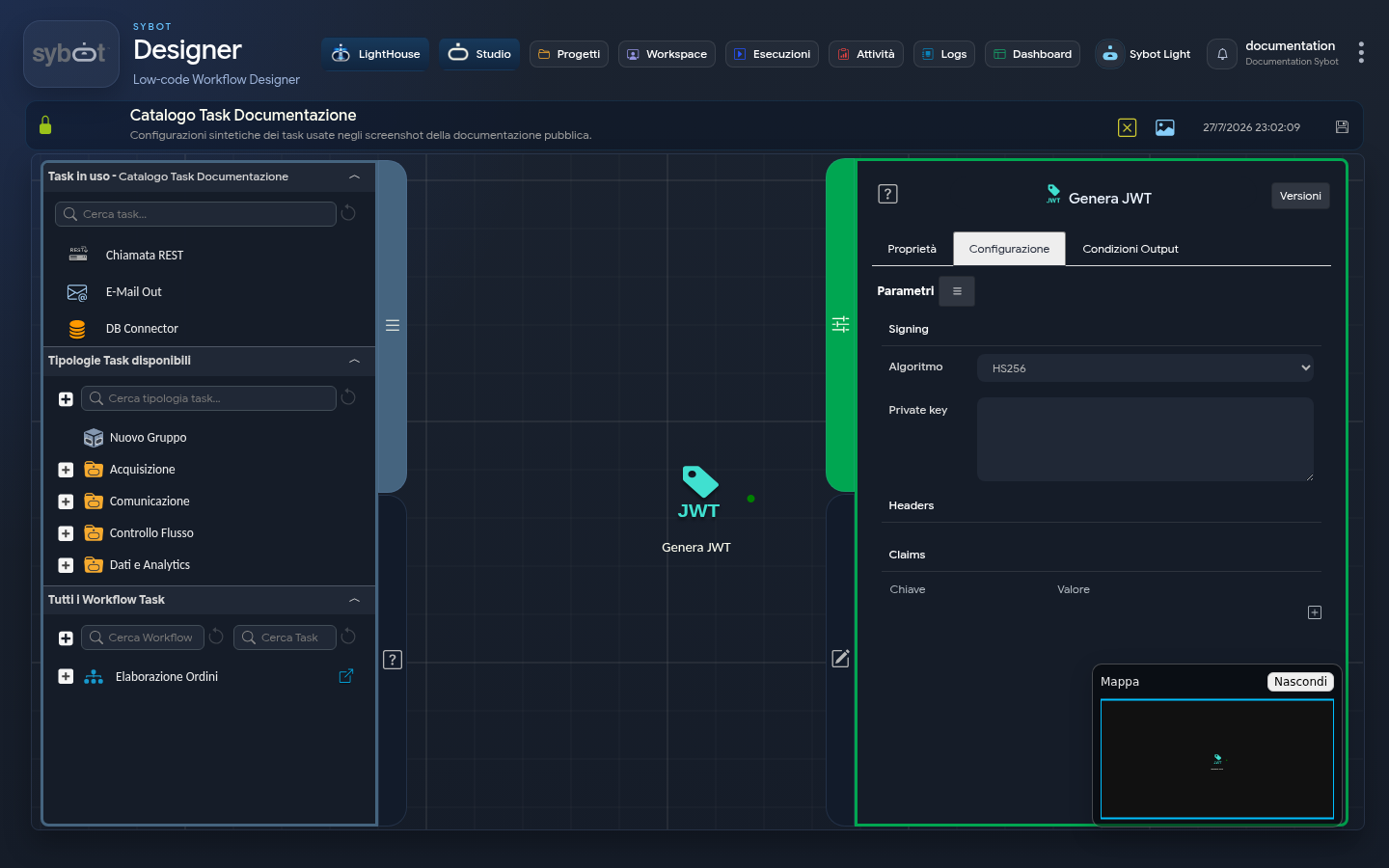
The Generate JWT task allows you to create JWT tokens by configuring the various parameters required for token generation.
JWT Definition
A JSON Web Token (JWT) is an open standard (RFC 7519) that defines a compact and self-contained way for transmitting information between parties as a JSON object. This information can be verified and trusted because it is digitally signed. JWTs can be signed using a secret (with the HMAC algorithm) or a public/private key pair using RSA or ECDSA.
Purpose of JWT
JWTs are commonly used for authentication and authorisation. When a user logs in, a token is generated that can be used to authenticate subsequent requests without having to resend the user's credentials.
Configuration
1. Signing
- Algorithm: Select the signing algorithm to use, for example RS256.
- Private key: Private key required for signing the token. It can be entered manually or via parameter.
2. Headers
- Section where to add the key-value pairs required for the header.
3. Claims
- Section where to add the key-value pairs for the required claims.
Each field in the Headers and Claims sections can be set manually or via workflow parameters and variables.
This configuration allows you to set the details required to generate a JSON Web Token (JWT).
Symmetric algorithms (HSxxx)
HS (HMAC with SHA) algorithms use a symmetric key, meaning the same key is used both to sign and to verify the token.
- HS256 (HMAC + SHA-256)
- Uses the SHA-256 hashing algorithm combined with HMAC.
- Balanced security: considered very secure today if the key is sufficiently long and random.
- Commonly used for internal applications where the signer and verifier are the same.
- HS384 (HMAC + SHA-384)
- Variant using SHA-384, producing longer signatures.
- Offers greater resistance to collisions compared to SHA-256.
- HS512 (HMAC + SHA-512)
- Variant using SHA-512, even more robust with a 512-bit output.
- Suitable for high-security contexts or where the key can circulate less protected.
Note: Being symmetric, they require that all participants know the same secret key. This can be a risk if there are multiple systems that need to validate the token.
Asymmetric algorithms (RSxxx)
RS (RSA Signature with SHA) algorithms use an asymmetric key:
- A private key signs the token.
- A public key verifies the token.
This is useful when you want to distribute tokens in environments where only the generator needs to possess the private key.
- RS256 (RSA + SHA-256)
- Most widely used algorithm for JWT in enterprise contexts.
- Secure, with good efficiency.
- RS384 (RSA + SHA-384)
- Variant that uses SHA-384 for greater cryptographic resistance.
- RS512 (RSA + SHA-512)
- More robust variant, using SHA-512.
- Offers maximum resistance to attacks, but with higher computational cost.
Note: Being asymmetric, they are better suited for distributed scenarios: the server issuing the tokens retains the private key, while clients or microservices receive only the public key to verify its validity.
Output Parameter
Upon completion of execution, the task makes the following Output Parameters available, usable as input in subsequent tasks in the Workflow.
- result: This parameter can return an error message or the result of the Task execution (the generated Token). This value can be used as input in subsequent Tasks (e.g. "
>#nome_del_task.result<#") - resultJson: represents the result of the task execution in JSON format, including general information, configurations, and details about the execution.