SOAP Calls
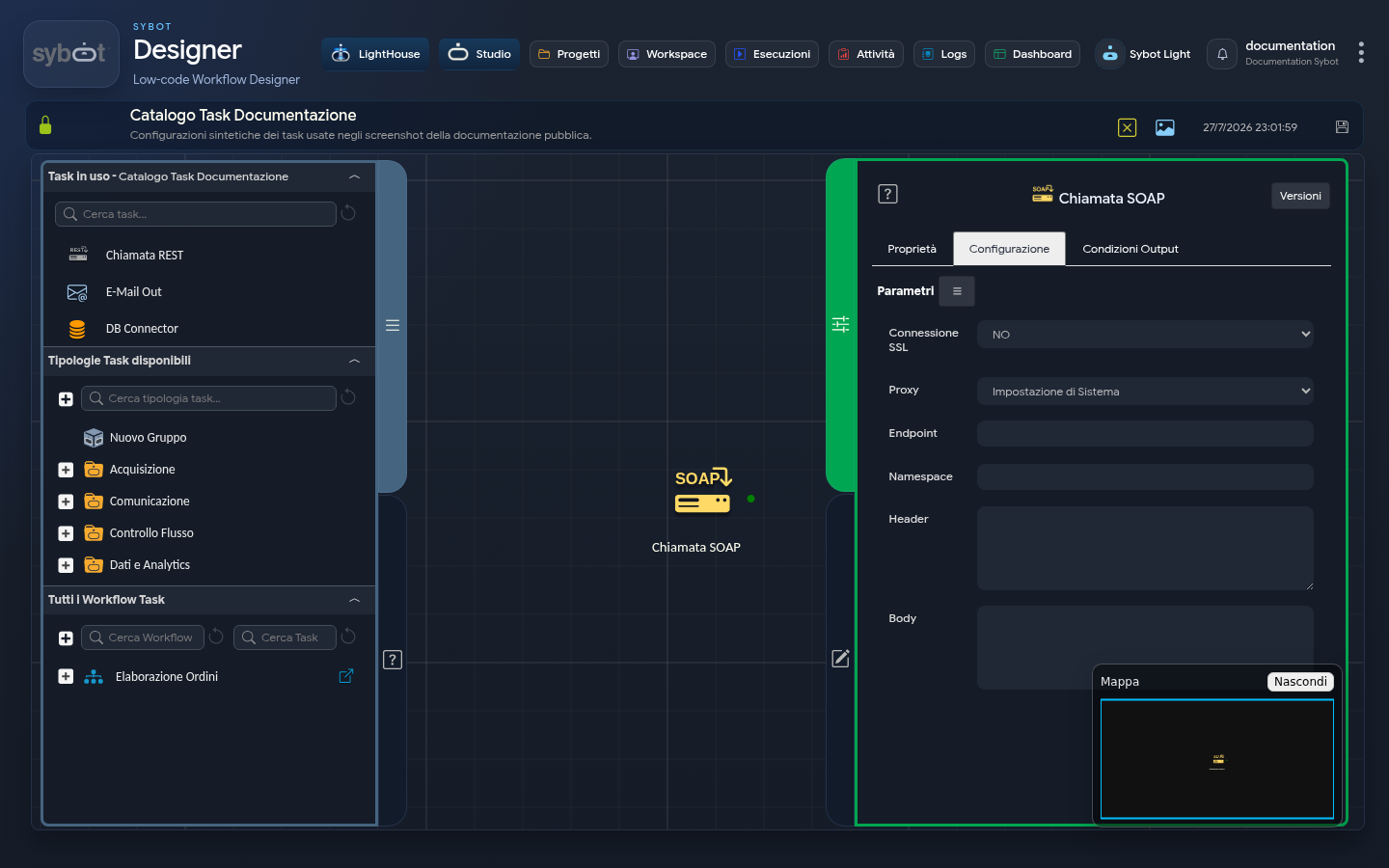
- Task type:
soap-call
Description
The "SOAP Call" task allows you to execute a request to a web service based on the SOAP protocol. The task automatically manages the construction of the XML envelope (Envelope) and the parsing of error messages (Fault) returned by the server.
Configuration Parameters
- SSL Connection: Specifies whether the call must use the SSL protocol (
yes/no). - Proxy: Configuration for routing the call:
- System Setting: Uses the system's default proxy settings.
- No Proxy: No proxy is used.
- Custom Proxy: Allows entering a specific address in the dedicated field.
- Endpoint: The full URL of the SOAP web service to query. (e.g.
https://www.dataaccess.com/webservicesserver/NumberConversion.wso). - Namespace: The XML namespace URI to associate with the
nsprefix within the request body. Enter the entire declaration, includingxmlns:ns=and the namespace in quotes. (e.g.xmlns:ns="http://www.dataaccess.com/webservicesserver/"). - Header: Insert the
<soap:Header>tag into the SOAP message. If there is no data to include, use<soap:Header/>. If the service requires information (e.g. authorization token), insert it inside the tag:
<soap:Header>
 <auth:Token>ABC123XYZ</auth:Token>
</soap:Header>```
- Body: Insert the
<soap:Body>tag containing the call data (e.g.<soap:Body><ns:Method>...</ns:Method></soap:Body>).
Important Technical Notes
- Envelope: Do not insert the
</soap:Envelope>tag. The task automatically generates the XML header and the opening/closing of the Envelope.- Content-Type: The task uses exclusively
text/xml; charset=utf-8as the default Content-Type and it is not modifiable.
Output Parameters
The task exposes the following parameters once the response is received from the server:
- result: Returns a text message describing the outcome of the operation.
- response: Contains the entire XML response sent by the server in case of success.
- faultCode: Returns the SOAP error code (e.g.
soap:Serverorsoap:Client) if the call fails. - faultString: Returns the textual error description provided by the web service.
- exitStatus: Operation status code (0 indicates success).
- resultJson: Complete representation of the task execution in JSON format.
Example resultJson
{
  "run_info": {
    "status": "Completed",
    "run_result": "Success"
  },
  "output_parameters": {
    "exitStatus": "0"
  }
}
Error Handling
In case of a SOAP error (presence of a <soap:Fault> node), the task is marked as Failed. The error details will be mapped to the faultCode and faultString parameters, facilitating debugging or the management of conditional branches in the workflow.