REST Calls
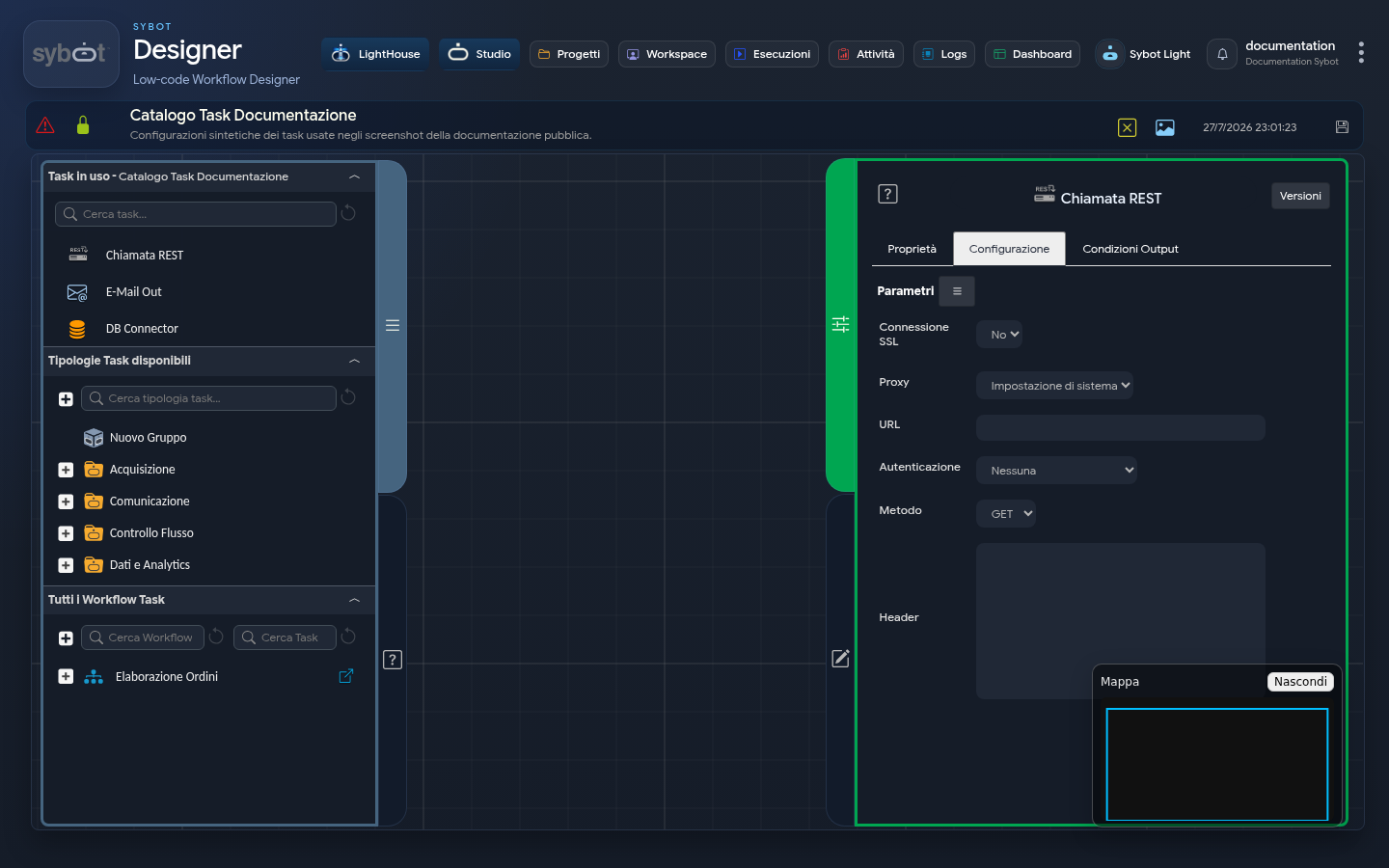
The REST Call task enables the Workflow to interact with external systems via REST APIs. It allows sending HTTP requests and managing responses from web services, enabling integration with external applications.
It is the primary tool for communicating with other platforms, such as ServiceNow, Salesforce, ticketing systems, cloud databases, and countless other services, both for retrieving data (GET) and for sending or modifying information (POST, PUT).
Configuration
The task configuration defines every aspect of the HTTP request that will be sent. The task configuration fields can be set manually or via workflow parameters and variables.
SSL Connection
Specifies whether the call must use the SSL protocol (yes/no).
Proxy
Defines connection routing via the following options:
- System setting: uses the proxy configured at the global level.
- No Proxy: the call is made directly without passing through a proxy.
- Custom Proxy: enables the Proxy Address field for manual entry of a dedicated server.
URL
Enter the full address of the endpoint to which the request will be sent in this field. It is possible to build the URL dynamically using parameters.
Authentication
A menu to select the authentication method required by the destination API. The options are:
- None: For public APIs that do not require credentials.
- Basic: Standard authentication via username and password.
- Bearer: Authentication via a security token (Bearer Token) that must be inserted in the request header.
User
The username for Basic authentication.
Password
The password associated with the user for Basic authentication.
Token
The field where to insert the security token when using Bearer authentication.
Method
The HTTP method to use for the request, which defines the type of operation to perform:
- GET: To retrieve data from a resource.
- POST: To create a new resource.
- PUT: To completely update an existing resource.
Header
- Text area dedicated to defining the HTTP headers to include in the request. Headers must be specified as a string array, where each element represents a header in the format:
- Required format: ["Key: Value", "Key2: Value2"]
- Basic example: ["Content-Type:application/json;charset=utf-8"] - key*: Content-Type and* value*: application/json;charset=utf-8*
- Content and Language example: ["Content-Type:application/json;charset=utf-8", "Accept: application/json", "Accept-Language: it-IT, it;q=0.9"]
Body
A text area to insert the body (payload) of the request. This field is used mainly with methods such as POST and PUT to send the data to be created or modified. To ensure that the JSON content is interpreted correctly, the “string:” directive must be used.
Example:
string:{
 "state": "#>state<#",
 "work_notes": "#>work notes<#"
}
Usage Example
Output Parameters
Once the external service has responded to the call, the task exposes the following output parameters, which are crucial for processing the result of the request:
- headers: Contains the headers of the response sent by the server.
- response: Contains the body of the response sent by the server.
- result: Indicates the overall status of the Task execution.
- resultJson: Represents the result of the task execution in JSON format, including general information, configurations, and execution details.
- httpCode: Returns the HTTP status code of the response.
- 200 (OK), 201 (Created): The request was successful.
- 400 (Bad Request), 401 (Unauthorized), 404 (Not Found): Client-side error.
- 500 (Internal Server Error): Server-side error.
Example resultJson parameter
{
  "run_info": {
    "status": "Completed",
    "run_result": "Success"
  },
  "output_parameters": {
    "exitStatus": "0"
  }
}