Unix Search Text
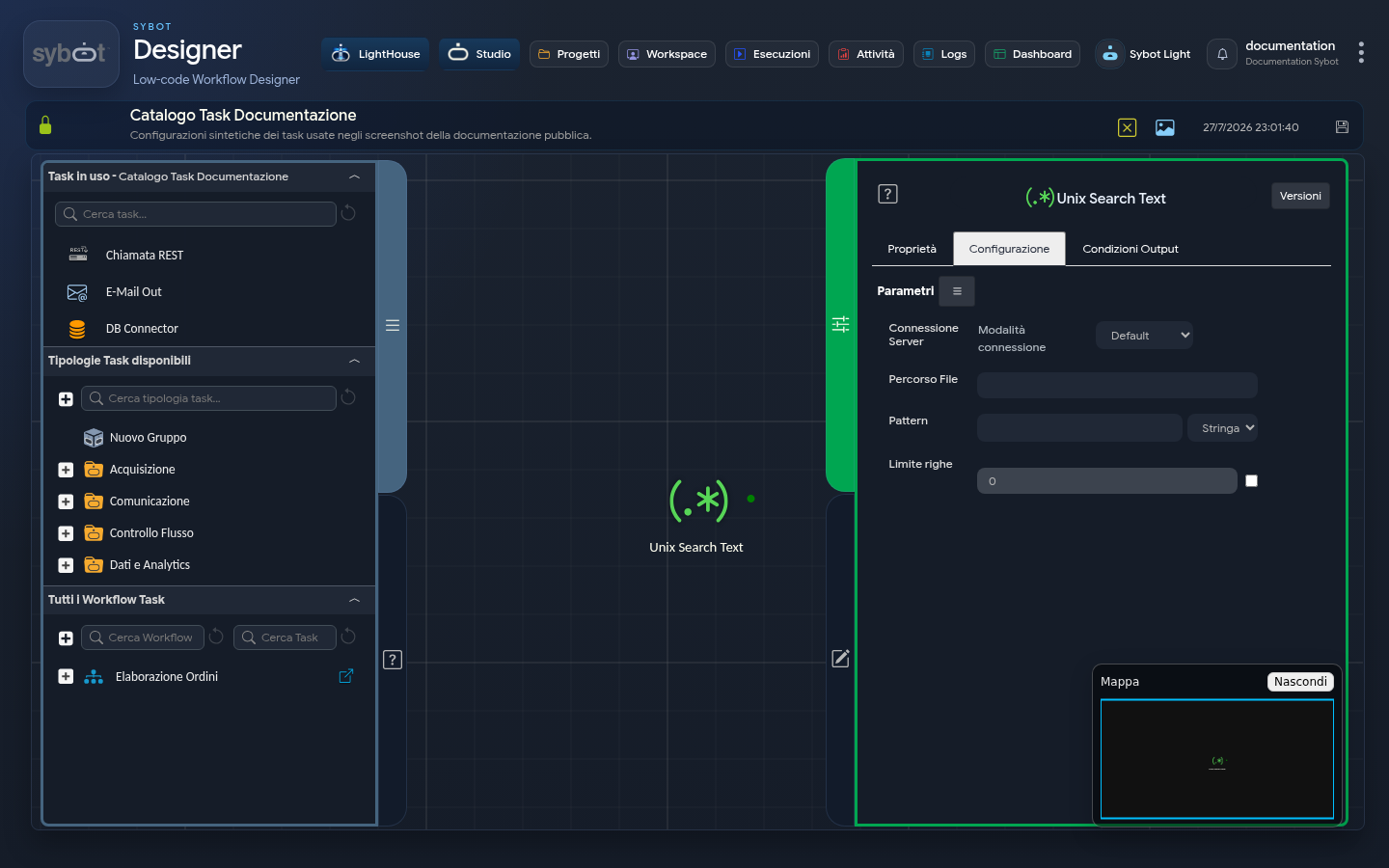
- Task type:
ssh_searchtext
Description
The Unix Search Text task allows you to search for a string or text pattern within a file, either on a remote server (via SSH) or on the local machine (Default mode).
It can be used to analyse log files, identify error messages, or verify the presence of specific information in configuration or text files.
Configuration
The task configuration defines the connection details (if required), the file to analyse, and the text to search for. Task configuration fields can be set manually or via workflow parameters and variables.
Server Connection
- Connection mode: defines the source of the credentials used for the connection. It can assume three operating modes:
- Default: the search is performed on the local machine, without an SSH connection.
- Manual: allows the manual entry of SSH connection parameters.
- Environment: uses a preconfigured connection environment. In this mode, a menu is displayed listing the available connections based on the role associated with the Workflow.
- IP Address: IP address of the remote server.
- Hostname: host name of the remote server.
- User: user name used to establish the SSH connection.
- Password: password associated with the connection user.
- Port: port used for the SSH connection (the default value is 22).
Execute command as another user
By enabling this checkbox, you can perform the search with a user different from the one used for the SSH connection.
- User: name of the user under which the command will be executed.
- Password: password of the user used for executing the command.
Search Details
- File Path: the full path of the file on the remote server where the text search will be performed.
- Pattern: the text or expression to search for within the file. Next to the text field, a menu allows you to specify the search mode:
- String: the search will treat the pattern as a simple literal text string.
- RegExp: the search will interpret the pattern as a regular expression, allowing for much more complex and flexible searches.
- Line Limit: by enabling the checkbox, you can specify the maximum number of lines corresponding to the pattern that the task must return. If not enabled, all found lines will be returned.
Output Parameters
Upon completion of the search, the task exposes the following output parameters, providing not only the found lines but also quantitative data about the search:
- result: contains a text message describing the outcome of the operation.
- resultJson: represents the result of the task execution in JSON format, including general information, configurations, and execution details.
- occurrences: a numeric counter indicating the total number of times the Pattern was found. This is particularly useful because, if a single line contains the pattern multiple times, occurrences will count all of them, whereas result will return the line only once.
- exitStatus: returns the exit code of the grep command executed on the server.
- 0: indicates that at least one match was found.
- 1: indicates that no match was found (this is not an execution error for grep).
- Values greater than 1: indicate a syntax error or a problem accessing the file.
Example resultJson parameter
{
  "run_info": {
    "status": "Completed",
    "run_result": "Success"
  },
  "output_parameters": {
    "exitStatus": "0"
  }
}
Note
- The task executes a search command on the configured file, either locally or via an SSH connection.
- If you use a remote connection with SSH key authentication, the public key must be registered on the server.
- If the "Run command as another user" option is enabled, the command is executed with a user different from the main connection user.
- In Default mode, the search is performed on the local machine and no SSH connection is required.