Unarchiver
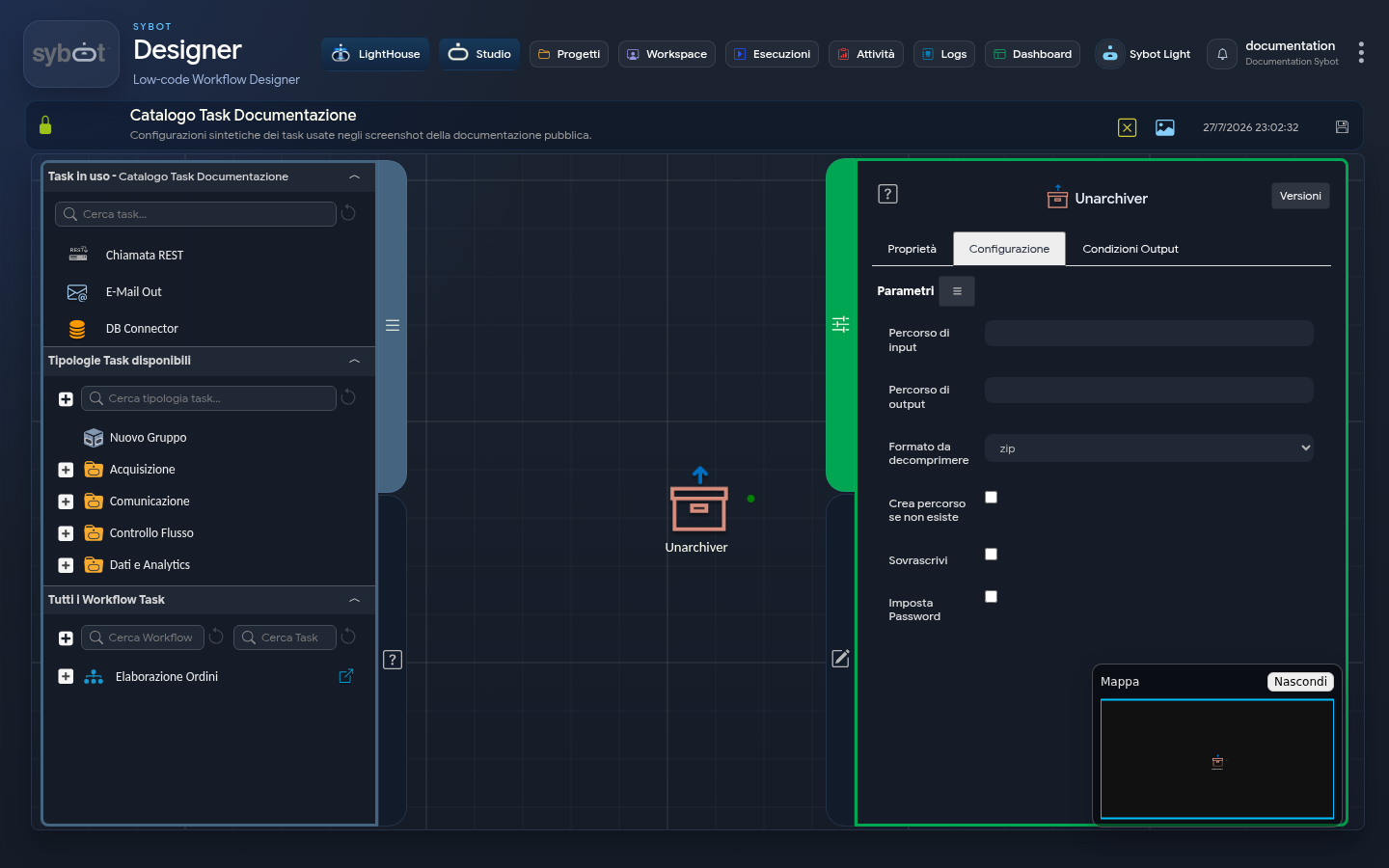
- Task type: unarchiver
Description
The "Unarchiver" task allows you to decompress archives, enabling the extraction of data into custom destination directories.
Configuration Parameters
- Input path: archive to decompress. You can use a parameter produced by a previous Task, for example
#>archivio.file<#. - Output path: directory where the files contained in the archive will be extracted.
- Format to decompress: dropdown to select the archive format (zip, tar, tar.gz, bzip2, tar.bz2, gzip).
- Create path if not exists: if selected, automatically creates the destination folder if it is not already present on the filesystem.
- Overwrite: if enabled, overwrites any files already present in the output path with the same name.
- Set Password: allows you to enter the encryption key for protected archives.
Note
This option is visible and usable only if the selected format is zip.
Output Parameters
- result: descriptive message of the operation outcome.
- filepath: absolute path of the directory where the files were extracted (the
Output path). - resultJson: represents the result of the task execution in JSON format.
Example resultJson
{
  "run_info": {
    "status": "Completed",
    "run_result": "Success"
  },
  "output_parameters": {
    "exitStatus": "0"
  }
}