Export Text
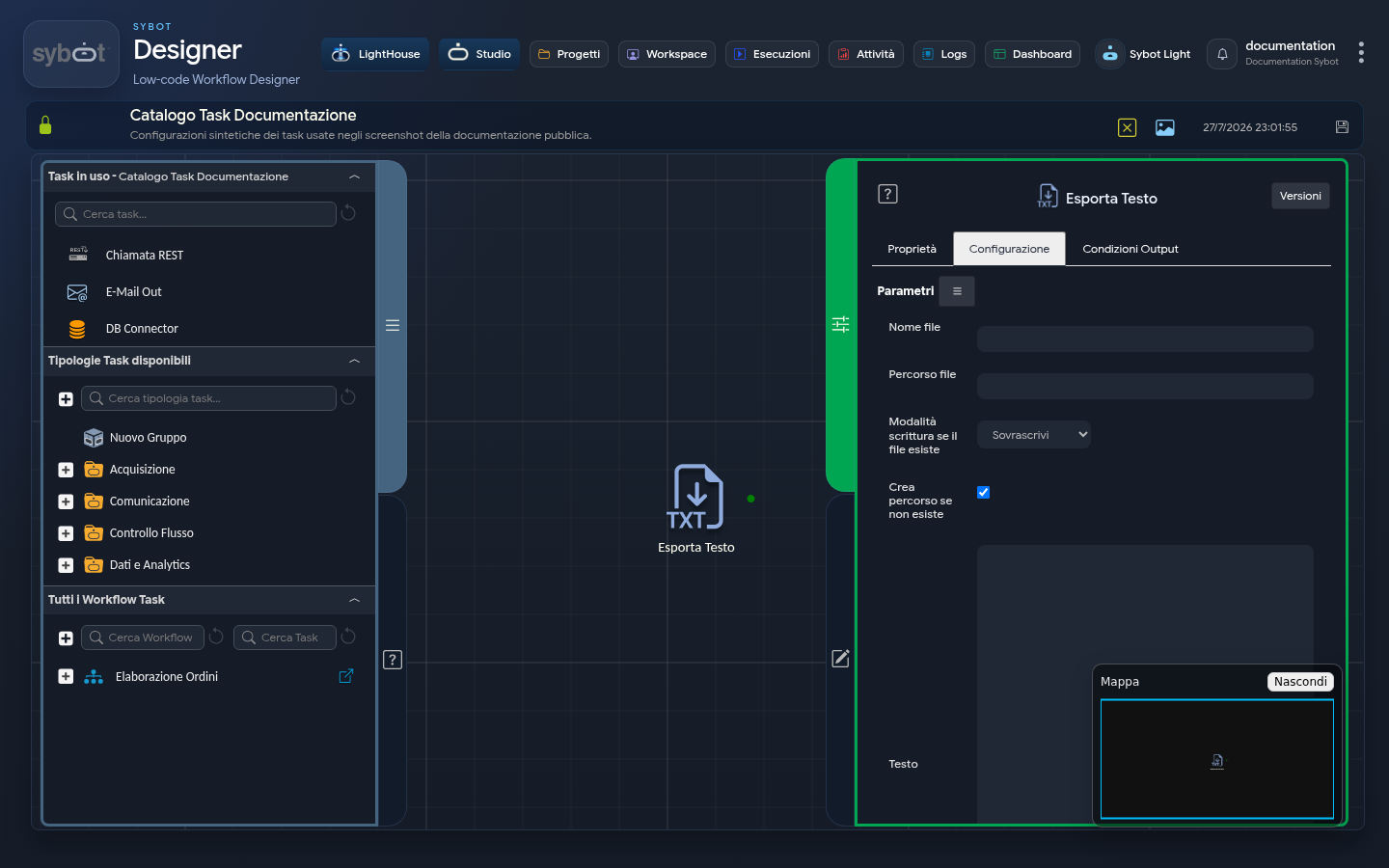
The Export Text task allows you to write textual content into a file at a specified path.
Configuration
The task configuration defines the file name, save location, content, and write behaviour if a file already exists. Task configuration fields can be set manually or via workflow parameters and variables.
- File Name: Specifies the name the output file will have, including its extension.
- Example:
report.txt - File Path: Indicates the directory (folder) where the file will be saved. The administrator must make a writable destination available.
- Write Mode if File Exists: Menu that defines the task behaviour when a file with the same name already exists in the destination. The available options are:
- Overwrite: The content of the existing file is completely deleted and replaced with the new content.
- Append: The new content is added to the end of the existing file, without line breaks.
- Append with Newline: The new content is added to the end of the existing file, but a newline character is inserted first to separate the old content from the new.
- Error: Task execution fails if the file already exists, preventing accidental overwrites.
- Create Path if Not Exists: If this option is enabled, the Task will automatically create the folder structure specified in "File Path" if it does not exist. If disabled, the Task will fail if the destination folder is not present.
- Text: The text area where the content to be written to the file is defined
Output Parameters
Once the Task has completed the write operation, it exposes the following output parameters that can be used in subsequent Tasks.
- out.file: Returns the full reference to the written file.
- out.filename: Returns only the name of the generated file (e.g. "report.txt").
- out.filepath: Returns the reference to the folder where the file was saved.
- result: Indicates the overall status of the write operation (e.g. "Success" or an error message).
- resultJson: Represents the result of the task execution in JSON format, including general information, configurations, and execution details.
Important Notes
- It is essential to ensure that the system on which the Workflow runs has write permissions for the path specified in "File Path".
- If the "Create Path if Not Exists" option is not enabled, the Task will fail if the directory is not present.