Archiver
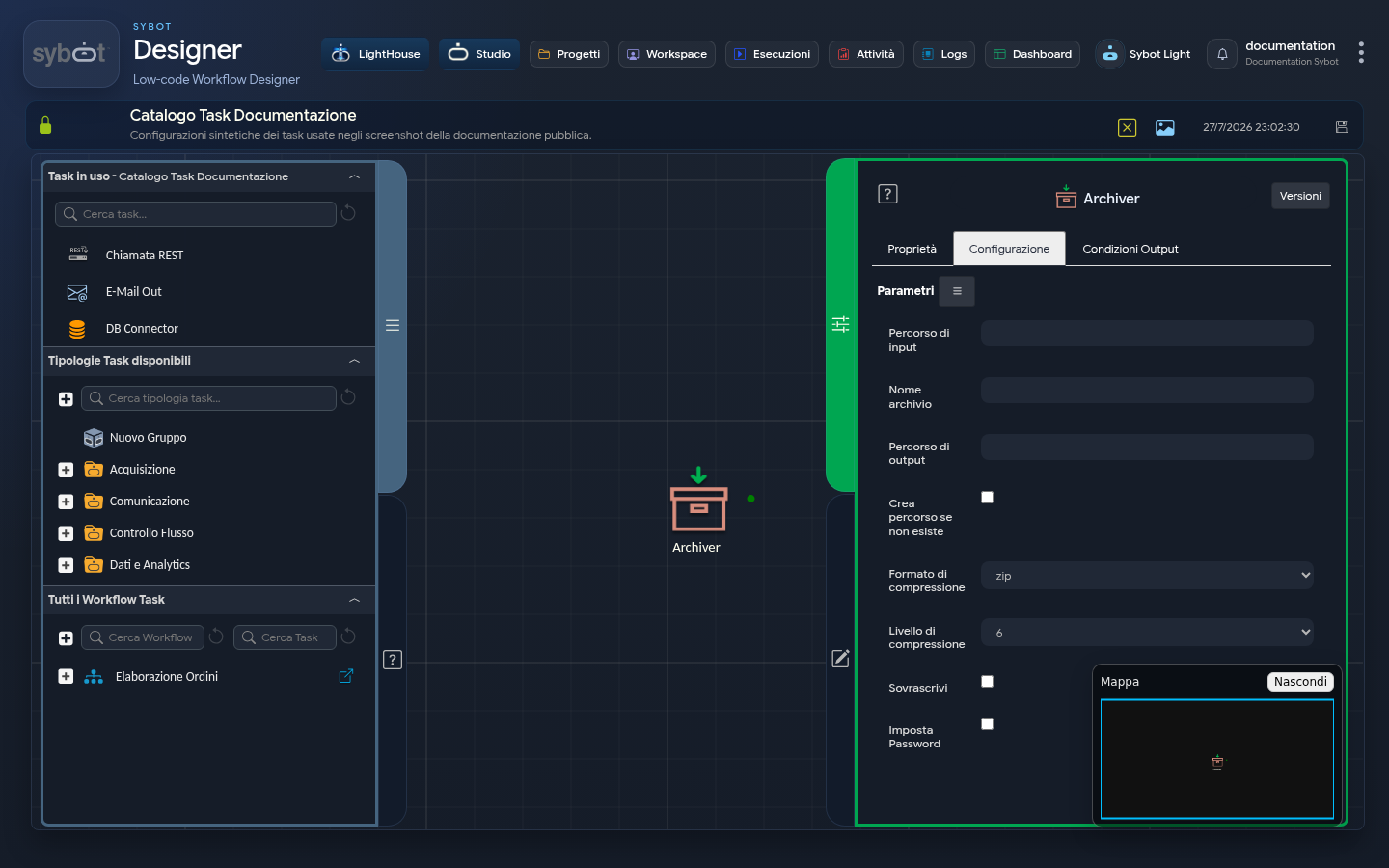
- Task type: archiver
Description
The "Archiver" task allows you to compress files or entire directories within the workflow, supporting various formats and space optimisation levels.
Configuration Parameters
- Input path: file or folder to compress. You can use a parameter produced by a previous Task, for example
#>documento.file<#. - Archive name: name that will be assigned to the final archive (e.g.
test_img). - Output path: destination directory where the archive will be saved.
- Create path if not exists: if selected, automatically creates the output folder structure if missing.
- Compression format: choice of format (zip, tar, tar.gz, bzip2, tar.bz2, gzip).
- Compression level: defines the intensity of compression on a scale from 1 (minimum compression, faster) to 9 (maximum compression, slower).
- Overwrite: if active, overwrites the existing archive with the same name in the output path.
- Set Password: allows you to protect the archive. The option is available only if the selected format is zip.
Note
The input and output paths must be different.
Output Parameters
- result: descriptive message of the operation outcome.
- file: absolute path of the generated archive.
- filename: name of the created archive including extension.
- resultJson: represents the result of the task execution in JSON format.
Example resultJson
{
  "run_info": {
    "status": "Completed",
    "run_result": "Success"
  },
  "output_parameters": {
    "exitStatus": "0"
  }
}