LightHouse — Query Knowledge Base
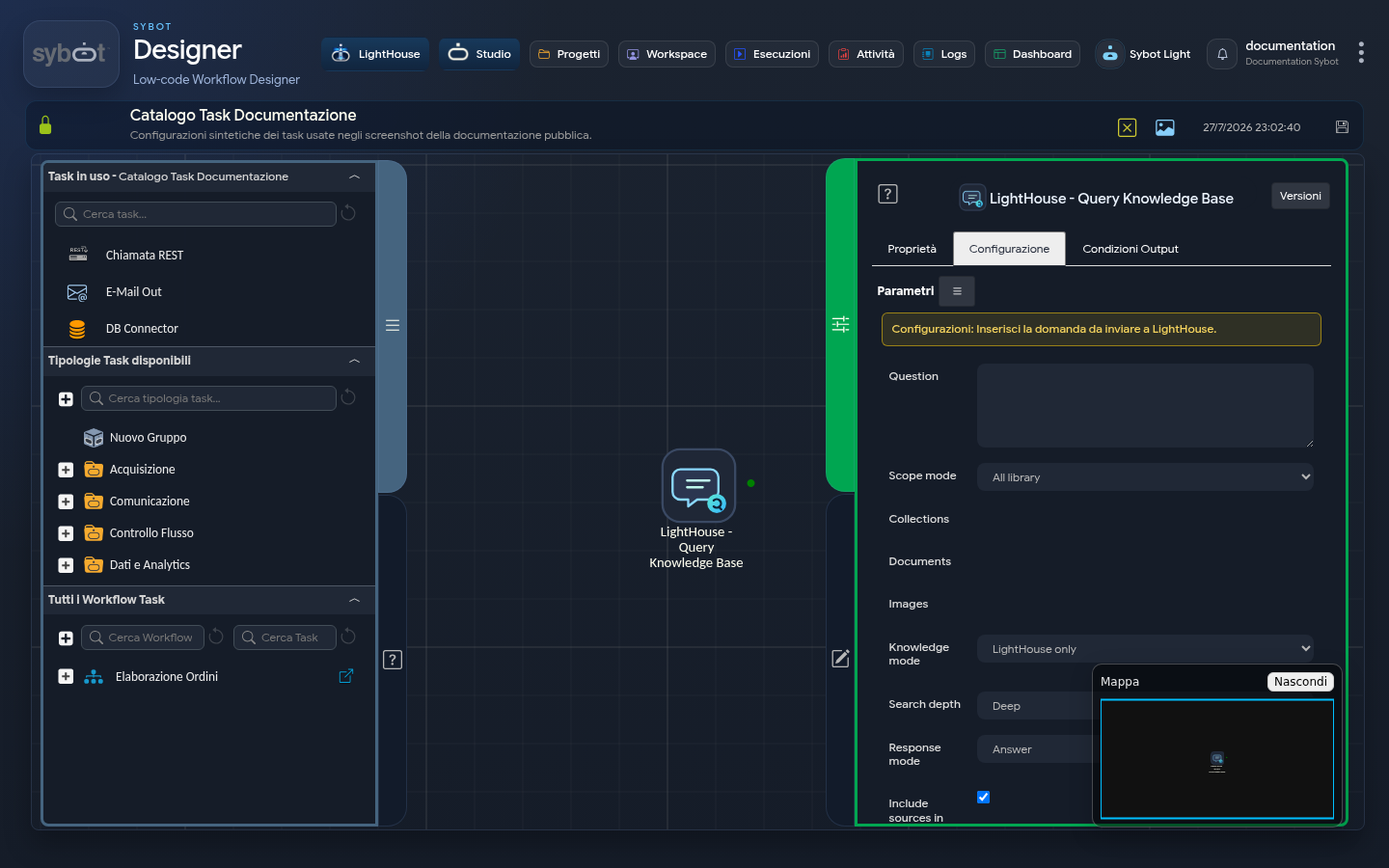
The LightHouse — Query Knowledge Base task poses a question to the Document Library and makes the answer available to subsequent tasks. It can also generate a file from the result.
Question and Scope
The Question field is mandatory and can contain Sybot parameters. The search scope can be:
- the entire Library;
- selected collections;
- selected documents;
- selected images;
- a combination of collections, documents and images.
The selectors show only content accessible to the user running the workflow.
Response Mode
| Field | Options |
|---|---|
| Knowledge Mode | LightHouse only, LightHouse first, documents + general knowledge or general knowledge only. |
| Search Depth | Quick, in-depth or complete. |
| Detail Level | Adaptive, concise, standard or in-depth. |
| Response Type | Answer, summary, structured output or JSON. |
| Include Sources | Adds references to the content used. |
For verifiable processes, keep Include Sources active and prefer a scope limited to genuinely relevant content.
File Generation
You can produce a file in MD, TXT, JSON, CSV, DOCX, XLSX, PDF or PPTX format. You can choose to:
- include sources in the file;
- wait for completion;
- save the result in the Library;
- select an accessible destination collection.
Results
The task makes the answer, sources, any warnings and the reference to the generated file available. A generated answer may contain errors: before using it in communications or decisions, check the sources and plan a review when the process requires it.
The search also uses the document relationships available in the Knowledge Graph to identify linked evidence. This behaviour does not require additional configuration in the task and does not modify the selected scope: only sources accessible to the user running the workflow are considered. The result metadata indicate whether the graph contributed and how many paths or blocks of evidence were used.
For interactive use of the same function, consult Document Chat and Knowledge Graph.