Iterator
- Task type:
iterator
The Iterator task is a powerful automation tool designed to run a repetitive process over a set of data. It takes a dataset as input and launches a "child" Workflow for each individual row of that Dataset.
This allows for the mass processing of large amounts of information, passing the values of each row as parameters to the child Workflow. It is the equivalent of a "for-each" loop for automation processes.
Prerequisites
To function correctly, the Iterator task must have one of the following tasks as input:
Configuration
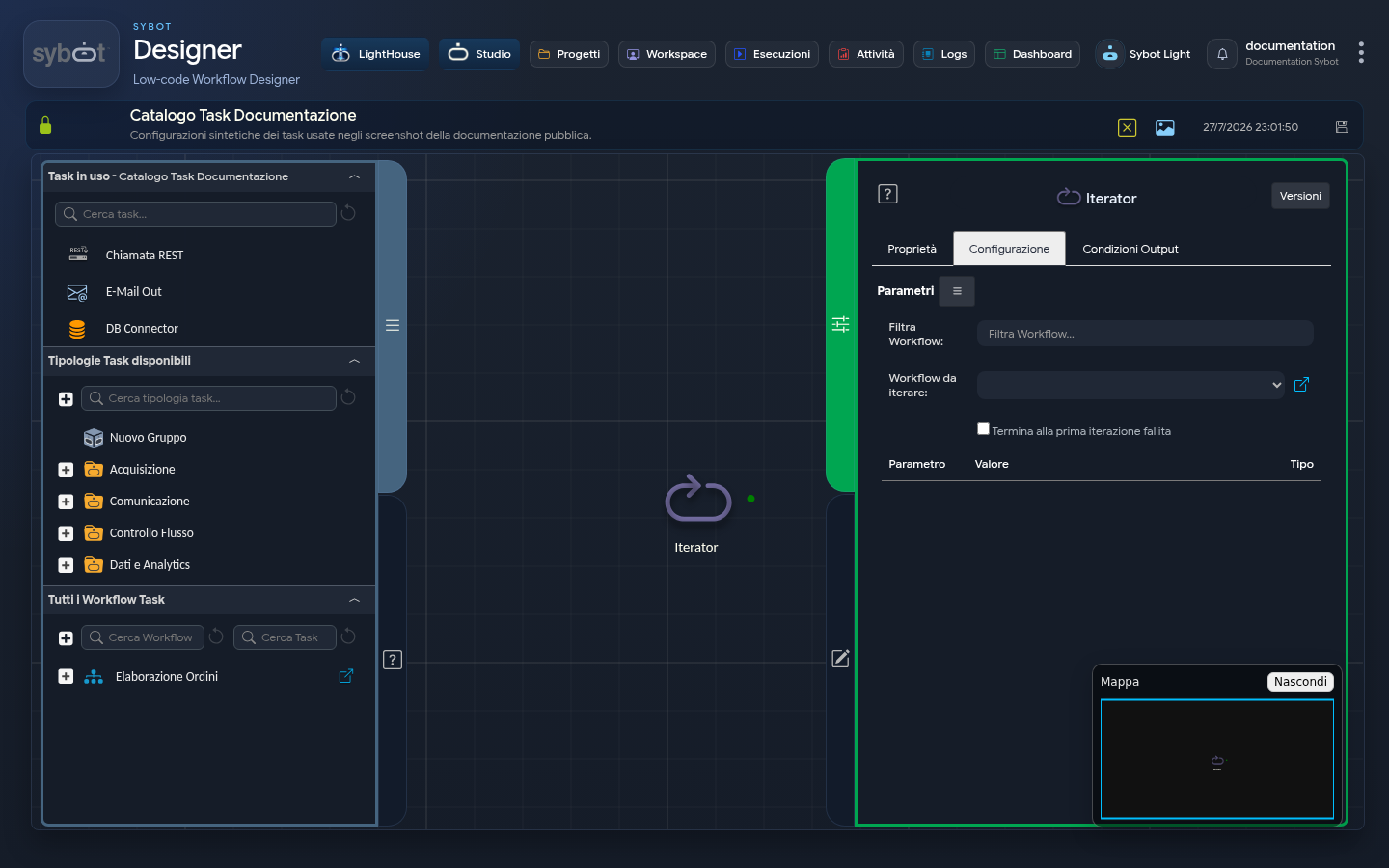
The configuration of the task defines which Workflow to run and how to pass data to each iteration.
- Filter Workflow: Allows filtering the list of available Workflows, facilitating the identification of those to be launched.
- Workflow to iterate: Selects from the menu the name of the "child" Workflow that must be executed for each row of the dataset.
- Stop at first failed iteration: If this checkbox is ticked, the Iterator will stop immediately as soon as one of the child Workflow executions fails. If it is not ticked, the Iterator will attempt to complete all iterations, even if some of them fail.
Parameter Configuration
This section allows mapping data from the input dataset to the parameters of the child Workflow.
- Parameter: The name of the parameter as defined in the child Workflow (e.g., "department").
- Value: The value to assign to the parameter for the current iteration.
- Example:
#>JSON to Table.Dataset.department<#indicates that, for each row, the value of thenamecolumn of the dataset produced by the JSON to Table task will be passed as the value. - Type: The data type of the parameter (e.g., String, Numeric, etc.).
Practical Example of Operation
Iterator Configuration
- Parent Workflow (Data Preparation):
- The Import text task reads a JSON file containing a list of employees.
[
  {
    "name": "John",
    "surname": "Smith",
    "department": "Human Resources"
  },
  {
    "name": "Emily",
    "surname": "Johnson",
    "department": "Finance"
  },
  {
    "name": "Michael",
    "surname": "Brown",
    "department": "IT"
  },
  {
    "name": "Sarah",
    "surname": "Davis",
    "department": "Marketing"
  }
]
- Subsequently, the JSON to Table task performs its main function: it connects to a database and writes the JSON data into a table. The execution log confirms this with the message "4 rows inserted into table". In addition to writing to the database, the task makes specific output parameters available that represent the processed and inserted data, allowing their reuse in subsequent tasks of the Workflow.
- Configuration and Action of the Iterator:
- Workflow to iterate: is set to "dev_iterator".
- Parameter: The child Workflow expects a parameter called "department".
- Value: The value of the "department" column of the dataset is mapped to this parameter:
#>JSON to Table.Dataset.department<#.
- Execution of Iterations: The Iterator now executes the "dev_iterator" Workflow 4 times, once for each row (employee) of the dataset:
- First iteration: Launches "dev_iterator" passing the parameter department = "Human Resources".
- Second iteration: Launches "dev_iterator" passing department = "Finance".
- Third iteration: Launches "dev_iterator" passing department = "IT".
- Fourth iteration: Launches "dev_iterator" passing department = "Marketing".
- Logic of the Child Workflow (dev_iterator):
- On each execution, the Conditional task inside evaluates the value of the "department" parameter received and routes the flow to the correct Send Email task. For "IT", finding no specific condition, it will follow the "Otherwise" path.
- Final Result:
- Four distinct emails are sent, one for each employee present in the original JSON file. The Iterator task execution log confirms success with the message: "All iterations completed successfully".
Parent Workflow
Child Workflow
Important Note
- Only Workflows that are not locked in edit mode at the time of execution can be run.
- The Iterator task will end with the "Success" status only if all iterations succeed (unless the "Stop at first failed iteration" option is active, in which case it will stop at the first error).
Output Parameters
Upon completion of all its iterations, the Iterator task exposes a series of output parameters. These parameters are extremely useful for subsequent tasks, for example for logging purposes, to send a summary report, or to implement conditional logic based on the cycle outcome.
- targetWorkflow: Returns the name or identifier of the "child" Workflow that was executed in each iteration.
- Dataset.Count: Indicates the total number of rows present in the input Dataset.
- Iterations.Total: The total number of iterations that were actually executed. In a normal execution, this value will match Dataset.Count.
- Iterations.Success: The counter for iterations that concluded successfully. Every time a child Workflow execution ends correctly, this number is incremented.
- Iterations.Failed: The counter for failed iterations. If a child Workflow execution ends with an error, this number is incremented.
- result: Provides the overall status of the Iterator task itself. Usually, it indicates "Success" only if all iterations have been completed successfully.
- resultJson: Represents the execution result of the task in JSON format, including general information, configurations, and execution details.