LightHouse
Sybot LightHouse is the document library and corporate knowledge area of Sybot. It brings together documents, collections, images and templates accessible to the user and allows them to be queried via a chat that displays the sources used.
The visible content and available actions depend on the permissions associated with the user's profile and roles.
1. Interface areas
The page is organised into three zones:
- the sidebar, with knowledge search and document filters open on startup;
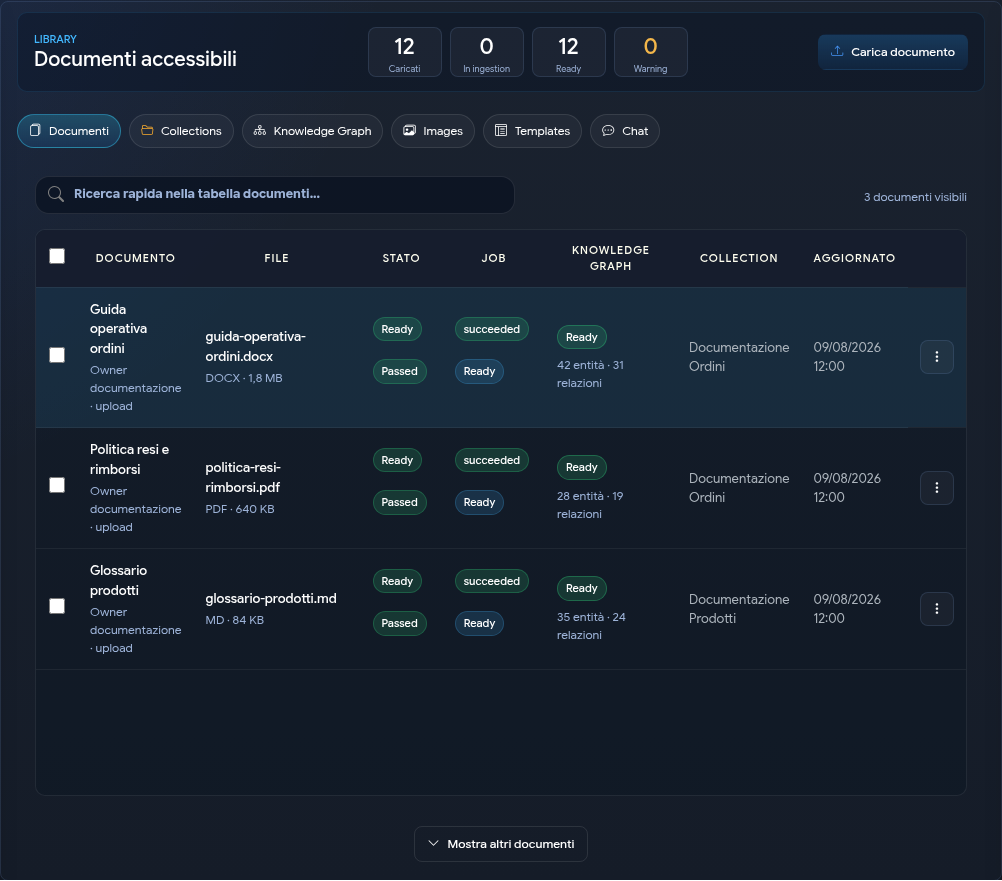
- the central workspace, with tabs Documents, Collections, Images, Templates, Chat and Knowledge Graph;
- the Details panel, which changes depending on the selected document, collection, template or session.
The Details panel can be collapsed to leave more space for the workspace.
2. Library indicators
The Documents tab contains four indicators:
| Indicator | Meaning |
|---|---|
| Loaded | Documents already loaded in the table; the + symbol indicates that further pages are available. |
| In ingestion | Documents whose preparation is still in progress. |
| Ready | Documents ready for search and chat. |
| Warning | Documents for which verification is required. |
The Ready status indicates that the document can be used for document search. A newly uploaded document may take some time before it becomes ready.
The table is loaded progressively to keep the page responsive even with extended libraries. Show more documents adds the next page; search and filters still operate on the entire authorised library, not just the rows already visible.
3. Knowledge search
The Search in knowledge box accepts a question or some keywords and returns the most relevant passages among the authorised documents.
This search is useful for:
- quickly identifying the document containing a piece of information;
- comparing passages from different sources;
- opening the source document before formulating a more detailed question in the Chat.
The search always respects the user's permissions.
4. Filters
The Filters panel limits the list of documents by:
- title or file name;
- active document, archived or both;
- preparation status;
- quality status;
- extension;
- collection.
Quick search in the documents table instead acts on the results already displayed. Use Reset to return to the full list of accessible documents.
5. Main paths
- To upload, version and share content, consult Documents and Collections.
- To catalogue and search visual content, consult Image Explorer.
- To generate files with reusable styles, consult Templates and generation.
- To ask questions with controlled scope and sources, consult Document chat.
- To explore entities and relationships supported by documents, consult Knowledge Graph.
6. Permissions
LightHouse applies permissions to documents, collections and templates:
- content can be personal or shared with functional roles;
- documents can inherit roles from the collection;
- authorised users can view and download;
- management actions appear only to those with the necessary permissions.
If an expected content item does not appear, check the filters and ask the owner or a role administrator to check its sharing settings.
The generated responses help you consult the library, but do not replace verification of the source. Always open citations when the information is relevant for a decision.